
Lumavo AI
AI that edits the photograph. And runs the studio.
Engines that keep the house true while they change the sky, the light or the furniture. An assistant that books a shoot from a sentence and checks you in on site. And a door for your own Claude or ChatGPT to run the studio with you.


What it does to the photograph
The house stays the house. Everything else is yours to change.
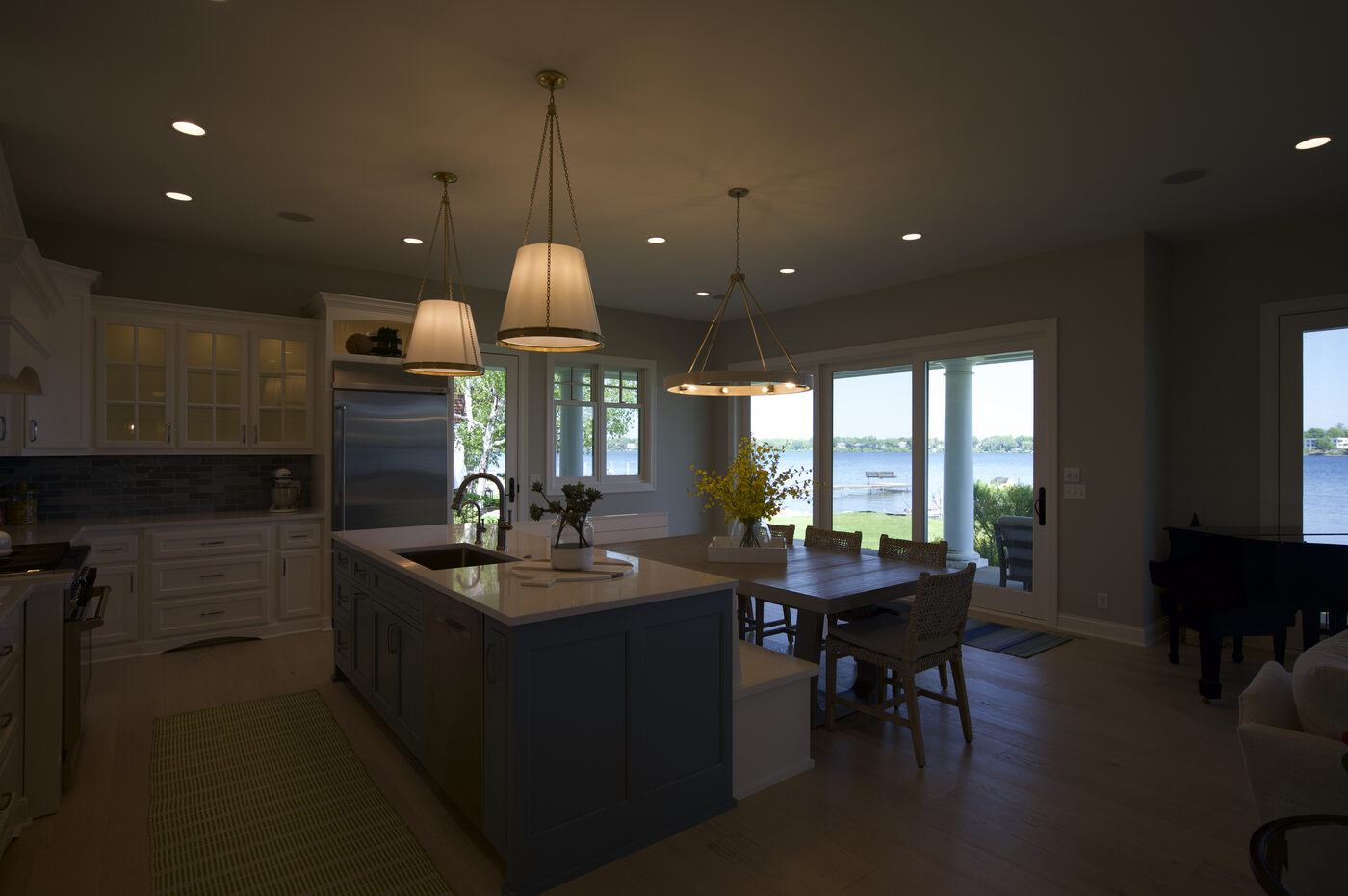
 Lumavo HDRSingle frame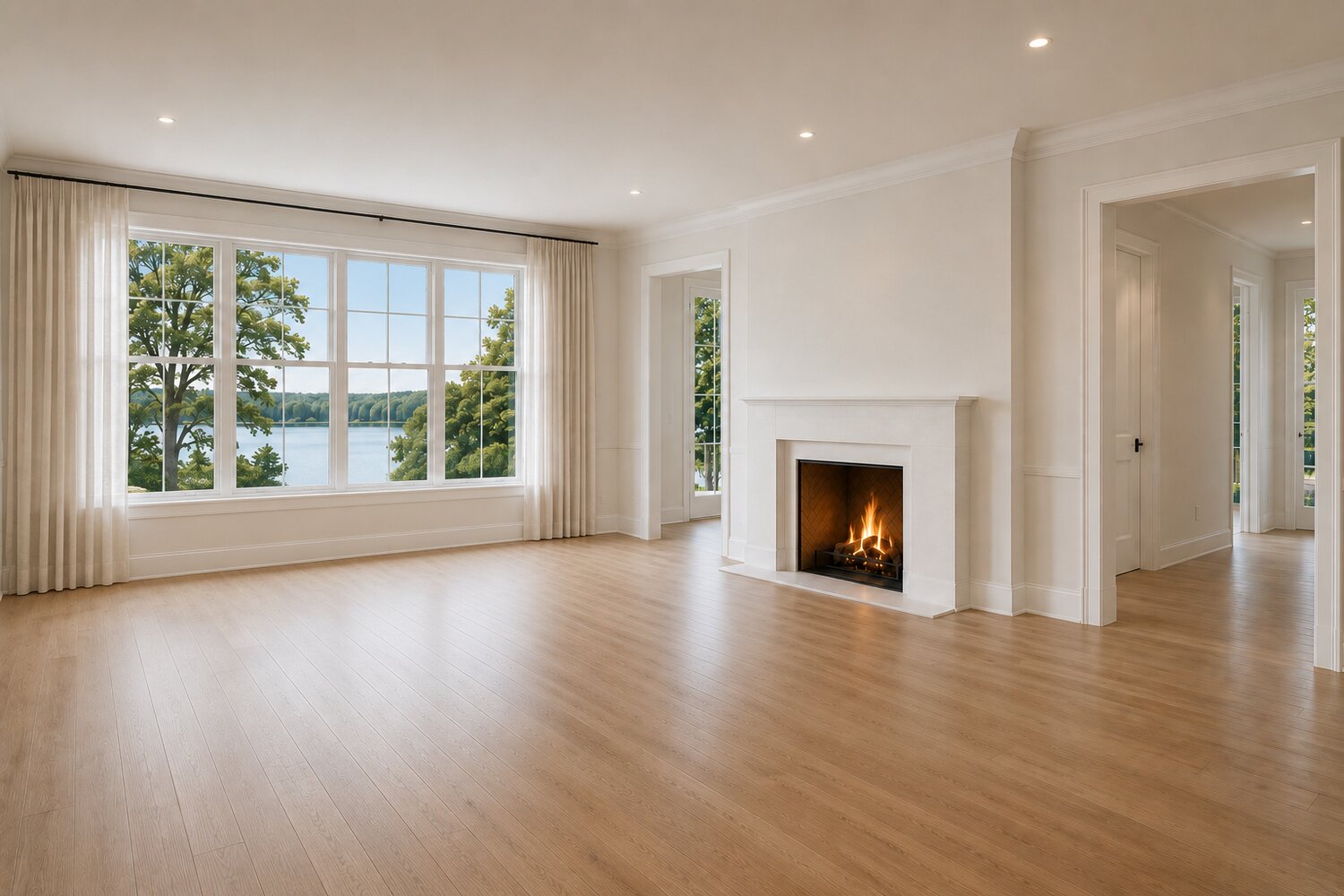
 Lumavo stagingEmpty
HDR enhancement
Bracketed RAW straight off the card, grouped automatically, merged and corrected. The photograph you shot, at its best.
Twilight, where the sun actually set
Sunset, Twilight or Dusk from one daytime exterior. SolarSync works out where the sun went down for that address on that date and lights the house from that side.
$2 per photo, regenerations free · two included per Pro listingHow it works →
Virtual staging that keeps the house
Walls, windows, flooring, light fixtures and the camera angle stay exactly as shot; what is beyond the glass stays what the camera saw. Furniture is the only thing that changes.
$2 per photo, corrections freeHow it works →
Matched angles of the same room
Stage one angle, then match the second, third and fourth to it — the same sofa, rug, lamps and art in every shot, so a living room reads as one room, not four.
$2 per angle
Restage an occupied room
Replace the furniture that is there, not just furnish an empty one. The room, its light and its bones are untouched.
Ask for a change, in plain English
“Move the sofa off the wall with the air conditioner.” “Swap the rug.” Lumavo reads the photograph first, then changes only the region the request touches and puts every other pixel back exactly. Free and unlimited.
Declutter
Counters, floors and surfaces cleared; the room itself untouched.
Sky replacement
A believable sky, kept to the sky. The house and its light are left as photographed.
Lawn enhancement
Green that reads as grass, kept inside the lawn.
Object removal
Brush the object; only the brushed pixels are repainted.
Canvas extend
More room at the edge of a tight frame, in keeping with what is there.
Cinematic listing video
Motion Studio turns the stills into a listing film — vertical and horizontal generated together.
Juno · the assistant inside Lumavo
Say it while you drive. Tap once when you stop.
A photographer’s day is drive, shoot, drive. Juno takes a spoken sentence, shows you exactly what she heard, and books it on one tap. She does not talk back while you work, and she never books what she was not sure of.
“Create a listing at 4567 Fireweed Lane, Anchorage, Monday at 1:30 — photos only. Not sure of the square footage.”
Here is what I heard. Tap once to book it.
A gap is shown, not guessed. A misheard address is never silently booked.
“What’s on today?”
Three on the calendar.
Read straight from your shoots, in your timezone.
“Where am I going next?”
Next up: 56 Covey Lane at 11:30.
The one read-only ask that answers straight away, no confirm needed.
“Check me in.”
Checked in — your agent has been texted.
One tap on site; the agent knows you have arrived.
Connect your own AI
Run the studio from the AI you already pay for.
Lumavo gives you a private connection for Claude or ChatGPT. Once it is in, your assistant can read your calendar, find any shoot by address or agent, look up a client, list what is unpaid, read your service menu — and, if you allow it, book a shoot. It starts read-only. It shows you a booking and waits for your yes. It has no way to email or text a client. Every question it asks is listed in Lumavo, and one click revokes it.
- Read-only by default. Scheduling, Clients, Catalog and Billing each start at view.
- Booking is a preview, then a yes. Nothing lands on the calendar from a sentence alone.
- No emailing, ever. The connection has no tool that contacts a client.
- Your subscription, not ours. Usage runs on your own plan with them; Lumavo adds nothing.
- Cut it off instantly. Revoke in Settings; the next request is refused.
Settings → Connect your AI. Included with Lumavo.
“Who still owes me for last month?”
Two shoots are unpaid, $680 in total. Want me to open them?
“Book 4567 Fireweed Lane Monday at 1:30, photos only.”
Here is what I would book — nothing is booked yet. Shall I?
Rights on this connection: Scheduling · book. Clients · view. Catalog · view. Billing · view.
While you are out shooting
The studio reads the day so you don’t have to.
Today's shoots, what is owed and the one thing to do first — sent only on days there is something worth saying. Opt in from Settings.
Overdue invoices are nudged on your cadence, without you drafting a line.
A shoot at risk from the forecast is flagged so there is time to move it.
And Pulse, the first screen to open in the morning: one recommended next action, who is behind, what is owed, today’s route — stated plainly, not as a wall of charts.
In your control
Powerful, and never out of your hands.
The photograph is the truth
Structure is locked: walls, windows, flooring, fixtures, the view through the glass. An engine may change the sky, the light or the furniture. It may not change the house.
It asks before it books
Juno shows a card and you tap once. A connected assistant must show you the booking and get a yes. Nothing lands on the calendar from a sentence alone.
Nothing emails your clients on its own
No AI surface in Lumavo sends a client an email or a text unprompted. The connection for your own AI has no such tool at all.
Every version is kept
A photograph is paid for once. Regenerations and corrections are free, and every version stays so you can compare and choose.
Your AI, your rights
Per-area permissions — Scheduling, Clients, Catalog, Billing — start at view. Every question and booking is listed in Lumavo. Revoke in one click; the next request is refused.
Questions
Plain answers.
What does Lumavo's AI actually do?
Two things. It edits the photograph — HDR enhancement, twilight from a daytime exterior, virtual staging that keeps walls, windows, flooring and camera angle exactly as shot, matched angles of the same room, restaging occupied rooms, decluttering, sky and lawn, object removal, canvas extend, and cinematic listing video. And it runs the studio — Juno books a shoot from a spoken sentence, tells you what is on today and where to go next, and checks you in on site; your own Claude or ChatGPT can be connected to read your calendar, clients and invoices and, if you allow it, book.
What is Juno?
Juno is the assistant inside Lumavo. Today she does four things, deliberately: create a shoot from a sentence ("4567 Fireweed Lane, Monday at 1:30, photos only — not sure of the square footage"), tell you what is scheduled, tell you your next stop, and check you in or mark a shoot complete. Every booking is shown as a card you tap once to confirm; a misheard address is never silently booked. Voice is input only — she does not talk back while you work.
Can I use my own Claude or ChatGPT with Lumavo?
Yes. In Settings → Connect your AI, Lumavo gives you a private connection URL to paste into Claude (as a custom connector) or ChatGPT (in developer mode). Your assistant can then ask Lumavo what is on the calendar, find any shoot by address or agent, look up a client, list unpaid invoices and read your service menu. The connection starts read-only; you can allow booking, and even then your assistant must show you the booking and get your yes before it lands. Usage runs on your own subscription with them — Lumavo adds nothing.
What can a connected AI change, and what can it never do?
You set rights per area — Scheduling, Clients, Catalog, Billing — and each starts at view. Only Scheduling can be raised to booking. Nothing a connected assistant can do emails, texts or charges anyone: those actions do not exist on the connection. Every question and every booking it makes is listed in Lumavo, and you can revoke the connection in one click; the next request it makes is refused.
Does the AI change the house?
No. The source photograph is treated as the truth. Staging keeps walls, windows, flooring, light fixtures and the camera angle; what is beyond the glass stays what the camera saw; a twilight keeps the roof, the driveway and the landscaping and changes only the sky and the light. When a correction is asked for, Lumavo reads the photograph first and changes only the region the request touches — the rest of the pixels are put back exactly.
What happens when a render is not right?
Say what to change in plain English — "move the sofa off the wall with the air conditioner", "swap the rug" — or brush one object and change only that. Corrections are free and unlimited: a photograph is paid for once, every regeneration of it costs nothing, and every version is kept so you can compare them.
What runs Lumavo's AI?
Lumavo's imaging engines — the Lumavo HDR Engine, the Lumavo Twilight Engine and the Lumavo Virtual Staging Engine — are proprietary systems developed and refined by Lumavo through extensive engineering, testing, workflow design, quality control, prompt development, processing logic and real-world photographic evaluation. Like most modern software platforms, they may operate using a combination of specialized technology and infrastructure, but the design, processing workflows, quality controls and finished Lumavo experience are our own. Specific implementation details are proprietary. Several parts of the platform that look like AI are deliberately not — the Marketing Kit renders deterministically, and the lot-line and pin annotation tool is plain browser drawing with no model behind it.
Does anything run while I am out shooting?
Yes, and it is opt-in. A morning briefing arrives around 7am in your timezone on days there is something worth saying. Payment reminders go out on the schedule you set. Weather alerts flag a shoot at risk. Pulse reads the day when you open it: what to do next, who is behind, what is owed, today's route.
Less busywork. Truer photographs.
Everything a real estate photographer needs, beautifully integrated into one platform — and now, an AI that respects the photograph.